How to Remove Background from PNG: The Ultimate Guide

Why PNG Background Removal Matters
Staring at a pixelated, awkward white box on your website is a design sin. If you're building a presentation or social media post, you need a transparent PNG to layer your stuff without the clutter. It's about freedom. Pure, unadulterated freedom.
Stop wasting money on bloated software. By using an AI background remover, you’ll slash your workload from hours to seconds. No more pen tools. No more soul-crushing masking brushes.
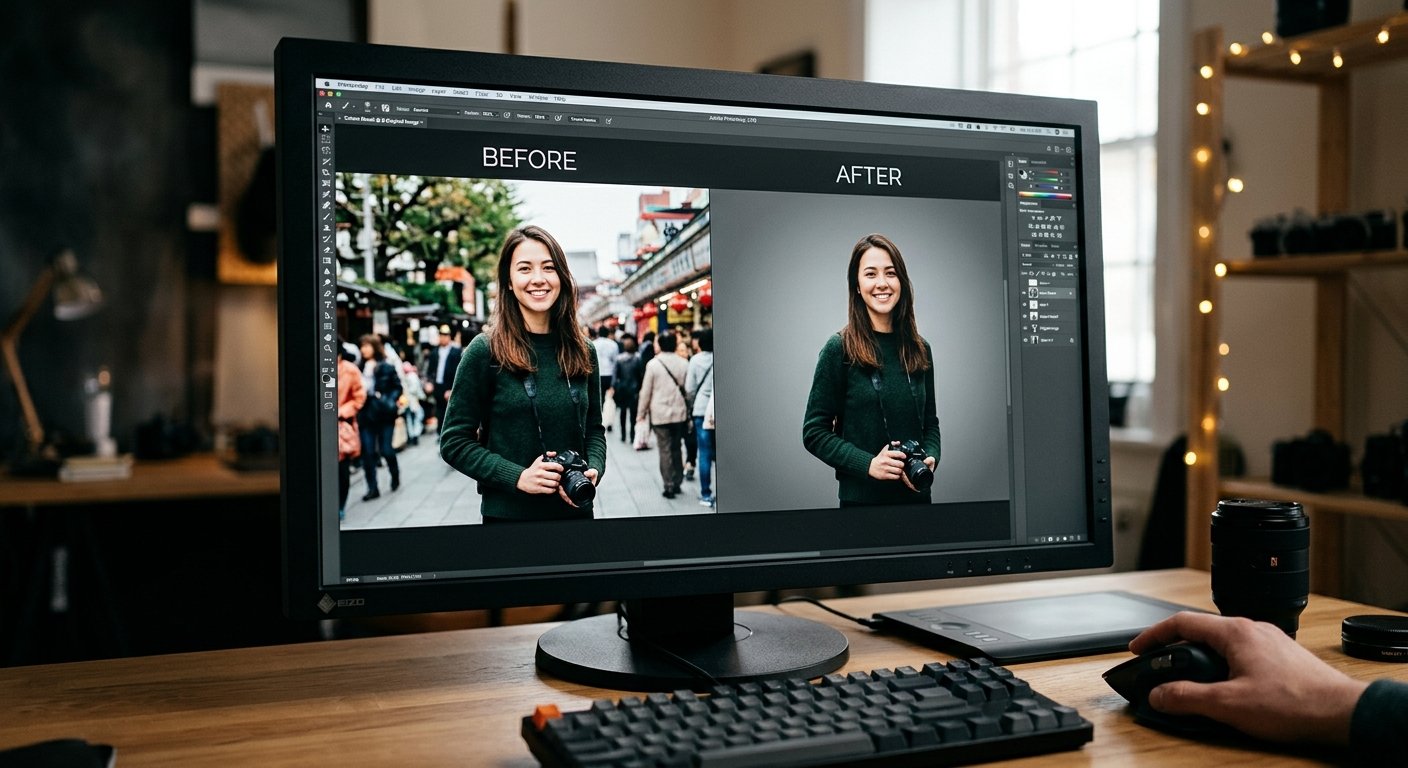
How does the magic happen? Advanced algorithms scan for edges, hunting down the difference between your subject and the noise behind it. It catches the messy details like hair or fabric folds. Crisp. Clean. Fast.
The Simple Way to Remove Background from PNG Online
Time is money, and you don’t have any to burn on manual pixel-pushing. Our online background eraser handles the heavy lifting so you don't have to. Toss your PNG or JPEG into the browser, watch the AI work its sorcery, and download your file.
Don't stop at the cutout. Use our auto-compress tool to shrink that file size before your page load speed tanks. Keep your site snappy. Nobody likes a slow-loading image.
Common Challenges with Image Cutouts
Not every photo plays nice with the software. White backgrounds often bleed into the subject, and messy edges can make you look like an amateur. These are standard hurdles. You just need to jump them.
Hair is the ultimate enemy. A basic, cheap tool leaves jagged, pixelated disaster in its wake. Use an HD background remover with edge refinement to keep the transition smooth. Don't let your subject look like a bad collage.
Forgetting file formats is a rookie mistake. Save as a JPEG, and you kill the transparency instantly. Stick to PNGs. If you mess up, just use our format converter to fix the damage.
Beyond Simple Transparency
Once you’ve got a clean subject, the world opens up. You can dump your product into our product studio to slap it onto a better background. Consistent imagery keeps your customers happy. It builds trust.
Fixing the background isn't always enough. Check your resolution using our image resizer to keep everything consistent. Uniformity is professional. Chaos is not.
Best Practices for High-Quality Results
Garbage in, garbage out. Pick high-contrast photos where the subject actually pops against the background. Ensure the lighting isn't a shadowy mess. Keep the files light.
Checking your edges after the process is a good habit. If you’re cleaning up crusty office documents, our smart doc assistant will handle the heavy lifting for you. Make it legible.
Frequently Asked Questions
Can I remove a background from a PNG for free?
Absolutely. Use our tools to get the job done without dropping a cent on expensive, over-engineered software.
Will I lose quality when I remove the background?
Not if you know what you’re doing. Export as a PNG, and you'll retain every bit of the original clarity.
Does the tool work on complex images?
Yes. Our AI is trained to isolate tricky details like fur and hair. It’s smarter than you think.
Can I batch remove backgrounds?
You can. Batch processing is a massive time-saver for anyone running a store. One click, dozens of images done.
Take Control of Your Visuals Today
Clunky software is a parasite on your productivity. Whether you’re prepping for an ad or a project, you need a tool that just works. Stop the struggle. Start the creation.
Ready to see it happen? Hit up our AI background remover and watch the pixels vanish. Make it easy. Experience the MakeMyVisuals difference.
Related Guides & Articles
- GTA 6 Launch Guide Reveals the Settings PS5 and Xbox Players Should Change First
- 10 Free Online Puzzle Games You Can Play Directly in Your Browser
- Best Free Brain Games to Play Online Without Downloading
- Photo Editing Quiz: Test Your Knowledge of Image Editing Basics
- Why Some Small Brands Are Getting More Attention Than Big Companies
- AI Agents Are Getting Smarter: What Can They Actually Do in 2026?
